

How to Calculate Your Power Backup Needs: A Simple Guide
Power outages will strike when you least expect them to, and no one wants to deal with costly downtime or damaged equipment. Comnet knows that choosing the right uninterruptible power supply (UPS) is not just about selecting an appliance but about protecting your business and bottom line.
As the trusted uninterruptible power supply in Singapore — Comnet Systems, we leverage years of local expertise to match your UPS capacity precisely to your needs.
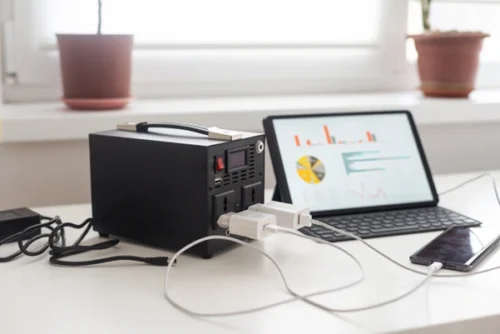

Learning the Basics: kW and kWh
You have to know the fundamentals first before you can determine your backup power needs.
- kW (kilowatt) is a power unit — how quickly energy is used.
- kWh (kilowatt-hour) measures energy — the total amount of power consumed over time.
Think of it this way: if your office equipment draws 1 kW of power for an hour, that’s 1 kWh of power.
Our Comnet experts help clients understand this technical information so that they are able to make the appropriate decision when choosing an uninterruptible power supply in Singapore.
Step 1: Identify Your Critical Equipment
Not everything in your plant needs backup power. Start by determining all of the critical equipment that must stay running in the event of an outage.
Typical examples include:
- Network devices and servers
- Emergency lighting
- Security alarms and systems
- Telecommunication equipment
- Medical or laboratory equipment (for certain industries)
Check the power rating for each device, usually indicated in watts (W) on the package or in the instructions. If not indicated, use the formula:
Watts = Volts × Amps
This simple computation allows you to calculate how much power each appliance is using.
Step 2: Calculate Total Power Requirements
Once you have the power rating for each device, figure out how long you’ll need to keep it running during a power outage.
For each device:
- Convert watts to kilowatts (1 kW = 1,000 W).
- Multiply the kW by the number of hours you’ll need backup.
- Add up the kWh for all devices.
Example:
| Device | Power (W) | Quantity | Hours Needed | Total Consumption (kWh) |
| Server Rack | 800W | 1 | 4 hours | 0.8 kW × 4h = 3.2 kWh |
| Router & Switches | 100W | 2 | 0.1 kW × 2 × 4h = 0.8 kWh | |
| Security System | 200W | 1 | 8 hours | 0.4 hours 2 kW × 8h = 1.6 kWh |
| Emergency Lights | 50W | 4 | 2 hours | 0.05 kW × 4 × 2h = 0.4 kWh |
| Total | – | – | – | 6 kWh |
In this example, you’d need at least 6 kWh of backup power.

Step 3: Insert a Safety Margin
Unexpected surges can happen when devices start up, so it’s smart to add a safety margin, usually 20–25%.
In our example:
6 kWh × 1.25 = 7.5 kWh
This enables your uninterruptible power supply system in Singapore to support abrupt spikes in demand without being interrupted.
Step 4: Choose the Correct UPS System
Now that you have an idea of just how much backup power you require, it’s time to choose a UPS system that suits your requirements.
Comnet Systems delivers Singapore uninterruptible power supply expertise across offices, data centers, hospitals, and industrial facilities—ensuring you get the right unit, whether it’s a compact desktop UPS or a large-scale backup solution.
Why Work with Comnet?
Tailored Solutions
We know that each business is distinctive. Our specialists analyze your existing power consumption and future needs to recommend a UPS system that protects you now and in the future.
Acquired Skills
Having years of experience in offering uninterruptible power supply Singapore solutions, we understand local needs, safety procedures, and industry-related issues.
Holistic Service
We do it all, from on-site power audits and product installation to preventive maintenance and 24/7 support. If there is a power problem, our local technicians are only a phone call away.
Dependable Brands and Technology
We partner with world-class brands to offer you reliable and efficient UPS solutions that give you maximum uptime and peace of mind.
Get Started with Comnet Today
Figuring out your backup power needs shouldn’t be a nightmare. With the right guidance and assistance, you can make a purchase that safeguards your business and keeps it operating at full capacity, no matter what happens.
At Comnet, we’re committed to helping you plan, choose, and maintain the perfect uninterruptible power supply for your Singapore business. Contact us for a customized analysis, and let’s power your business with confidence.
If you’re ready to safeguard your business against power disruptions, partner with your go-to uninterruptible power supply company in Singapore: Comnet Systems for custom analysis, seamless installation, and 24/7 support. Call us today to discuss your backup power requirements!
Frequently Asked Questions (FAQ)
How do I calculate power backup needs for my business?
Follow 4 steps:
1) Identify critical equipment
2) Calculate total kW requirements
3) Add 25% safety margin
4) Convert to kWh. Example: 6kWh base need + 25% buffer = 7.5kWh minimum UPS capacity.
What’s the difference between kW and kWh for UPS sizing?
kW (kilowatt) measures power consumption rate. kWh (kilowatt-hour) measures energy capacity over time.
UPS runtime depends on kWh: Higher kWh = longer backup during outages.e.
Why add a safety margin to UPS calculations?
Comnet Systems recommends 20-25% extra capacity to handle power surges during equipment startup.
This prevents overloads and extends UPS lifespan for Singapore businesses.
What equipment needs UPS backup protection?
Critical systems include: servers, network devices, security systems, emergency lighting, medical equipment, and telecom infrastructure. Non-essential devices can be excluded.
How does Comnet Systems help calculate UPS needs?
As Singapore’s trusted uninterruptible power supply company, Comnet provides: free power audits, load analysis tools, and custom UPS sizing for offices, data centers, and industrial facilities.
What UPS solutions does Comnet offer Singapore businesses?
Comnet Systems delivers tailored Singapore uninterruptible power supply solutions including: compact UPS for offices, modular systems for data centers, and industrial-grade units with extended runtime
Related Articles:

The Complete Guide of Uninterruptible Power Supply (UPS)
WHAT IS A UPS POWER SUPPLY? UPS is an uninterruptible control supply in Singapore designed to be...
What Are Uninterruptible Power Supplies?
A Power Supply That Isn’t Interruptible (UPS). When purchasing a computer, it is one of the most...


Singapore Office (HQ)
| Comnet Systems Pte Ltd | ||
| Address: | Block 1002 Jalan Bukit Merah #07-01/03 Singapore 159456 |
|
| Main: | +(65) 6272 3383 Click to Call | |
| Support: | Tech@Comnet.sg | |
| Enquiry: | Sales@Comnet.sg |
Philippines Office
| Comnet Systems Integration Inc. | ||
| Address: | Unit 6G , CBC Corporate Center, 724 Shaw Blvd, City of Mandaluyong, Second District, NCR, Philippines, 1555 |
|
| Main: | +63 2 85247088 Click to Call | |
| Support: | general@comnet.ph |