

How to Size a UPS for Your Server Room or Data Centre
A UPS that is too small drops your load the moment it is needed most, and a UPS that is too large wastes capital and runs inefficiently at low utilisation. Sizing comes down to three numbers: how much power your equipment draws, how long it must keep running, and how much headroom you leave for growth and surges. Get those right, and the rest is selecting a model that fits.
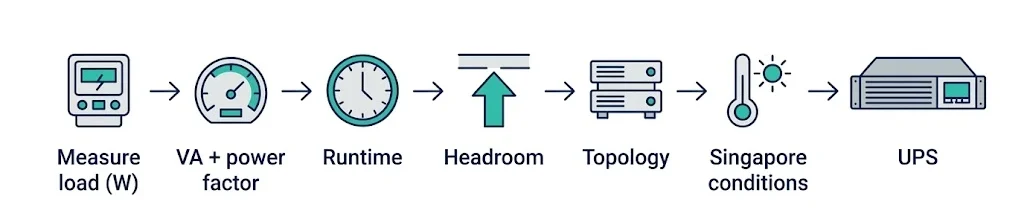

Most teams sizing a UPS for the first time anchor on the wrong figure. They look at a rack, add up the rated wattage on the equipment labels, and buy a unit that matches.
That number is almost always inflated; the runtime is guessed; and nobody accounts for the inrush when a generator kicks in or for the room adding two more servers next quarter. This guide walks through the calculation the way we run it on site, with a worked example at the end.
Step 1: Add up your actual load in watts
Start with every device the UPS will protect: servers, network switches, storage arrays, and any monitoring or out-of-band management gear.
The plate rating printed on each device is the maximum the power supply can draw, not what it draws in normal operation. A server with a 750 W power supply rarely pulls more than 300 W to 400 W under typical load.
Use measured figures where you can. A switched rack PDU or a clamp meter on the feed gives you the real draw, which is the number worth sizing against.
If you only have nameplate ratings, take roughly 60% to 70% of the total as a working estimate, then validate once the room is live. Sizing to the nameplate alone routinely produces a UPS 40% larger than the room ever needs.
For a small server room, the load list might look like this:
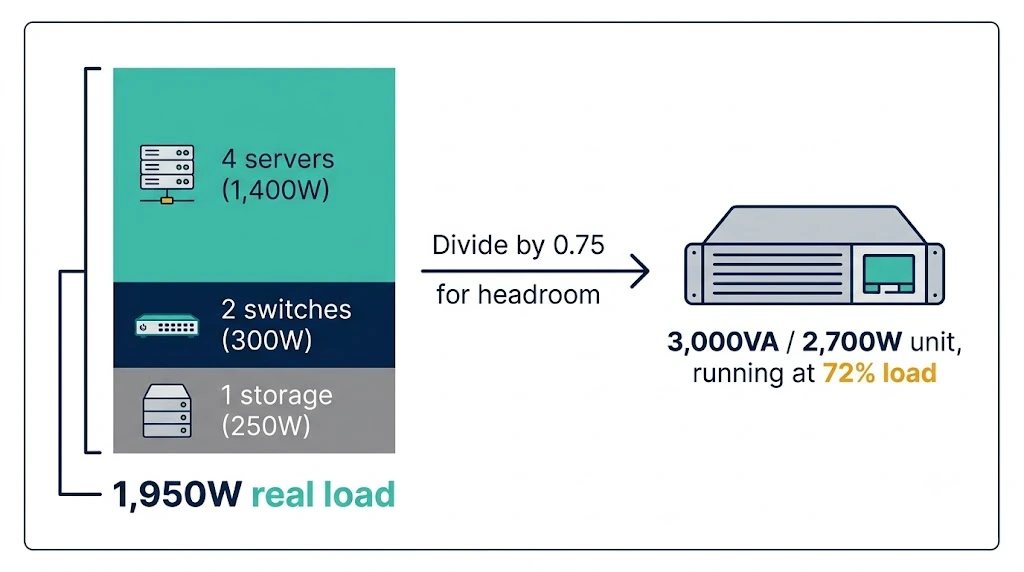
- 4 servers at 350 W each: 1,400 W
- 2 switches at 150 W each: 300 W
- 1 storage unit at 250 W: 250 W
That totals 1,950 W of real load. As a quick rule for a single rack, a typical mix of servers and switches drawing around 2,000 W lands you in the 3,000 VA class once headroom is applied, which the next steps explain.
Step 2: Convert watts to VA and watch the power factor
UPS units are rated in two ways: VA (volt-amperes, the apparent power) and watts (real power).
The ratio between them is the power factor. Older units carried a power factor around 0.8, so a 1,000 VA unit delivered only 800 W. Modern online UPS systems run at a power factor of 0.9 to unity, where VA and watts are close or identical.
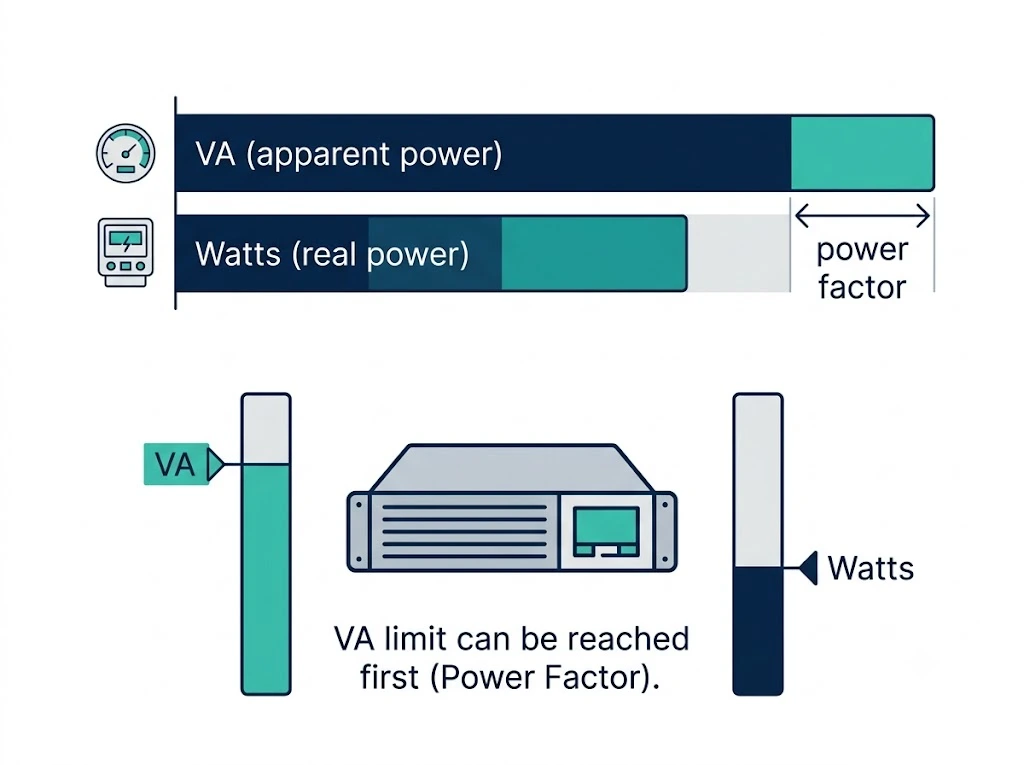

This matters because you can hit either limit first. If you size only on watts and ignore VA, a unit can run out of VA capacity before it reaches its wattage ceiling, and it will not carry the load. Check both ratings against your figures.
For the 1,950 W example, a UPS rated 2,000 W and 2,000 VA at unity power factor covers the real load, but it leaves nothing spare, which is the next problem to solve.
Step 3: Decide how much runtime you actually need
Runtime is where guesswork costs the most, in both directions. The question is what the UPS is there to do. If your site has a standby generator, the UPS only needs to bridge the gap until the genset starts and stabilises, which is usually 30 seconds to a few minutes. Sizing for an hour of battery in that case is wasted money and floor space.
If there is no generator, the UPS has to carry the load long enough for either a graceful shutdown or for staff to respond.
For an orderly shutdown of servers and storage, 10 to 15 minutes is a common target. For sites that need to ride through short outages without interruption, you are looking at 30 minutes or more, which usually means external battery cabinets rather than the internal batteries alone.
Runtime and load trade against each other. The same battery that gives 15 minutes at 50% load gives far less at 90% load, and the relationship is not linear.
This is one reason headroom matters: a UPS loaded near its limit delivers shorter runtime than the datasheet suggests, because datasheet runtimes are quoted at specific load points.
As a starting point, match the runtime target to what the UPS is actually there to do:
| Site setup | What UPS must do | Typical runtime target |
|---|---|---|
| Standby generator on site | Bridge until the genset starts and stabilises | 30 seconds to a few minutes |
| No generator, manual response | Hold load for a graceful server and storage shutdown | 10 to 15 minutes |
| No generator, ride-through needed | Carry short outages without interruption | 30 minutes or more (external batteries) |
Step 4: Add headroom for growth and inrush
Never size a UPS to sit at 100% of its capacity on day one. Two reasons.
First, equipment gets added: a room provisioned tight today needs replacing the moment someone racks another server.
Second, certain loads draw a brief surge well above their running figure at startup, and a UPS sitting at its ceiling cannot absorb that.
A practical target is to load the UPS to 70% to 80% of its rated capacity, leaving 20% to 30% as headroom.
For the 1,950 W example, dividing by 0.75 gives roughly 2,600 W, so a 3,000 VA / 2,700 W class unit is the realistic starting point rather than the 2,000 VA unit that just barely covered the bare load.
For data centres or any load classed as critical, headroom is not enough on its own. You also plan redundancy. An N+1 configuration adds one more UPS module than the load strictly requires, so a single module can fail or go into maintenance without dropping the load.
This is standard for facilities that cannot tolerate downtime, and it changes the sizing from one unit to a parallel configuration.
Step 5: Match the UPS topology to the room
The topology determines how the UPS conditions power, and the right choice depends on how critical the load is. Line-interactive units regulate voltage and switch to battery on failure, which suits small server rooms with reasonably clean mains and loads that tolerate a few milliseconds of transfer time. They cost less and run efficiently.
Online double-conversion units run the load through the inverter continuously, so there is zero transfer time, and the output is fully isolated from mains disturbances. This is the standard for data centres and for any load where a brief sag or transfer is unacceptable. It is also the right choice in buildings with unstable supply or heavy electrical noise. The tradeoff is higher cost and slightly lower efficiency, though modern units narrow that gap with eco modes.
For most Singapore server rooms protecting business-critical IT, online double-conversion is the safe default. The mains here is stable by regional standards, but the equipment being protected rarely tolerates the risk, and the cost difference is small against the value of the load.
Step 6: Account for Singapore conditions before you commission
Sizing on paper is only half the job. A UPS in Singapore runs in conditions that change its real-world capacity, and these factors decide whether the unit you sized actually delivers what the datasheet promised.
Heat is the first.
UPS capacity and especially battery life are rated at around 25 degrees Celsius. For every few degrees above that, valve-regulated lead-acid battery life drops sharply: a battery rated for 5 years at 25 degrees can lose half that life if it sits consistently at 30 to 35 degrees.
A server room that loses cooling, or a UPS tucked into an unventilated corner, ages its batteries fast and fails earlier than expected. Size the cooling for the UPS heat output, not just the IT load, because the UPS itself rejects heat into the room. The general rule is that the cooling system must remove the heat that the UPS and the protected load generate together, and in a tropical climate, that load runs year-round with no seasonal relief.
Plan the room temperature into the sizing decision, because a unit that is correctly sized electrically still underperforms if it bakes.
Humidity is the second factor.
Singapore’s humidity runs high, and condensation risk rises wherever a cool room meets warm outside air. UPS and battery installations need the room kept within the manufacturer’s humidity band, which means the same controlled environment the servers need, rather than a back room with a split unit that cycles off overnight.
Local standards and commissioning are the third.
Electrical work feeding the UPS falls under Singapore wiring regulations and must be carried out and certified by a Licensed Electrical Worker, and the installation should align with the building’s power and earthing standards. The unit needs proper input protection, correct earthing, and a maintenance bypass so it can be serviced without dropping the load.
Commissioning is where sizing assumptions get tested against reality: load bank testing confirms the unit carries the rated load, and a runtime test confirms the batteries deliver the time you sized for rather than the time the datasheet claims. Skip commissioning, and the first real outage becomes the test, which is the worst time to discover a sizing or battery fault.
Worked example: sizing a UPS for a small server room
Put the steps together for the room from Step 1.
The measured load is 1,950 W: 4 servers at 350 W, 2 switches at 150 W, and 1 storage unit at 250 W. There is no standby generator, so the UPS must hold the load long enough for a clean shutdown, which sets a runtime target of 15 minutes.
Apply headroom first.
Dividing 1,950 W by 0.75 gives 2,600 W, so the unit needs to be rated at least 2,700 W.
At a modern power factor near unity, that points to a 3,000 VA / 2,700 W online double-conversion unit. Check the VA limit as well as the watts: at unity power factor, the 3,000 VA rating covers the 1,950 W load comfortably, with room to grow.
Now, confirm the runtime at the real load point. The unit will sit at roughly 1,950 W against a 2,700 W rating, about 72% load.

Check the manufacturer’s runtime chart at that load, not at 50%, because the difference is significant. If the internal batteries give 15 minutes at that load, the internal pack is enough. If they give 8 minutes, add an external battery cabinet to reach the 15-minute target.
The result is a 3,000 VA online unit, sized at 72% load, with runtime confirmed against the actual draw rather than assumed. That single check, runtime at the load you will actually run, is the one most first-time specifiers skip.
This sizing logic scales. A larger server room or a data centre follows the same five steps, but the numbers grow, redundancy becomes N+1 or higher, and the power and cooling design moves from a single unit to a coordinated system.
Comnet sizes and designs UPS for critical loads as part of our power protection work, alongside our intelligent power distribution units that meter and manage the power downstream of the UPS, and our structured cabling and ICT infrastructure work that ties the room together. For complex rooms, it pays to speak with our team early because the sizing decision ties directly into the cooling, the electrical supply, and the redundancy design.
Related Articles:

How to Choose the Right UPS Capacity for Your Business
We understand here at Comnet that every business in Singapore relies on uninterrupted power in...
5 Critical Reasons Every Home Office and Small Business Needs a UPS
We at Comnet have seen the need for a reliable backup power solution, not just for large business...

Common Mistakes to Avoid when Choosing a UPS Company
As everyone is aware, life in the fast lane with high-tech living in Singapore, or any other...


Singapore Office (HQ)
| Comnet Systems Pte Ltd | ||
| Address: | Block 1002 Jalan Bukit Merah #07-01/03 Singapore 159456 |
|
| Main: | +(65) 6272 3383 Click to Call | |
| Support: | Tech@Comnet.sg | |
| Enquiry: | Sales@Comnet.sg |
Philippines Office
| Comnet Systems Integration Inc. | ||
| Address: | Unit 6G , CBC Corporate Center, 724 Shaw Blvd, City of Mandaluyong, Second District, NCR, Philippines, 1555 |
|
| Main: | +63 2 85247088 Click to Call | |
| Support: | general@comnet.ph |