
How to Write an Access Control RFP: A Procurement Guide for Singapore Facility Managers
Collecting quotations for an access control system looks simple: count the doors, brief a few contractors, compare the totals. Then one quote includes cabling, another leaves it out, and a third assumes the existing controllers can be reused. The totals sit side by side on one spreadsheet while describing three different projects.
An access control RFP (request for proposal) prevents that by fixing the scope, the requirements and the response format before any contractor prices the job. It does not need legal language. It needs the right details, written down in an order every vendor has to follow.
1. Build a door schedule and define the work
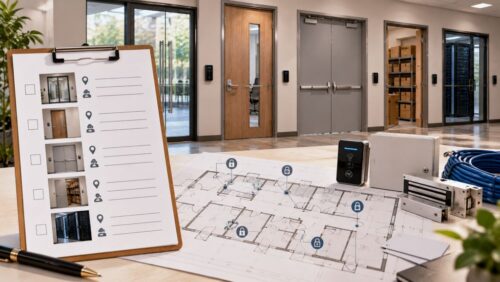
Start with every opening that needs controlled access: the main entrance, staff areas, storerooms, the server room, any gate or turnstile. For each one, record the location, the opening type, the existing lock and who uses it.
Then state what kind of project this is. A new installation, a replacement of an outdated system and an extension to another floor are priced differently, and vendors should not have to guess which one they are bidding for. Name the work the contractor must supply beyond the equipment: cabling, power supplies, door hardware, controller installation, software configuration and testing. Where existing equipment stays, identify it. Where its condition or compatibility is unknown, require a site survey before the vendor confirms a final price.
2. List the systems it must work with
Many buildings already run CCTV, intruder alarms or visitor management software, and the new system may need to exchange events with them rather than operate alone. List each system that will remain in use, with make and model where you have them. If nobody knows whether the old controllers are compatible, say so in the RFP and ask each vendor to state what it would need to check, instead of leaving them to assume. For each connection, require vendors to name the interface they will use to integrate access control with CCTV and alarm systems, such as ONVIF profiles, dry-contact relays or a direct software integration, and to say which party maps each access event to the camera or alarm response.
The same discipline applies to features. Remote administration, mobile credentials, entry logs and central management across several sites are all available, and not every building needs them. List the functions you require and leave out the rest, so that vendors price what you will use.
3. Set access rules, credentials and emergency behaviour
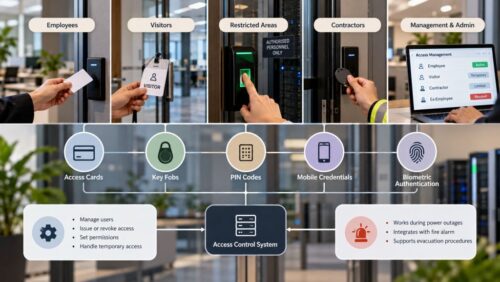
Describe who enters where. Employees might use cards, visitors need temporary credentials, and restricted rooms may need a second factor. Include the routine cases your team handles every week: a lost card, a contractor who needs access until Friday, a leaver whose permissions must be revoked the same day. Then name the credential types you will accept (cards, fobs, PIN codes, mobile credentials or biometrics) and ask vendors to list the extra hardware, licences and administration each one brings.
If biometric readers are on the list, the face or fingerprint templates become personal data under the Personal Data Protection Act (PDPA) once the system links them to a name or employee number. The PDPC’s Guide on Responsible Use of Biometric Data in Security Applications sets out what that means for an access control system: encrypt stored samples and templates, avoid keeping samples once templates are made, and delete a leaver’s template instead of only disabling their access. Write those points into the RFP as requirements, and ask each vendor to state where templates are held and how deletion works. The same guide asks organisations to consider non-biometric options such as keycards first, so record why biometrics are needed for the doors that use them.
Emergency behaviour belongs in the RFP, not in the commissioning meeting. State how each controlled door must behave on power failure and on a fire alarm signal: whether its lock releases (fail-safe) or stays locked (fail-secure). For doors on escape routes, require electromagnetic and electromechanical locks to be connected directly to the building’s automatic fire alarm system, which deactivates them. Routing that signal through the access control or building management system is not permitted where it delays release. Require each vendor’s design to show this direct fire alarm connection for every controlled door on an escape route.
4. Write measurable technical and software requirements
“A reliable, modern system” gives a vendor nothing to price. Specify the number of readers and controllers, the expected number of users, the network the system will run on, the power arrangement and any backup power. If more doors may be added later, state how many, so the controllers are sized for them.
Give software its own section: user roles and permissions, access logs and how long they are kept, the reports you need, and remote management where required. Add cybersecurity requirements such as individual administrator accounts with strong authentication, secure remote access and a stated process for software updates.
5. Tell vendors exactly how to respond
This is what turns a specification into an RFP. Give every vendor the same pricing schedule to fill in, with separate lines for equipment, labour, cabling, licences, integration, testing, training and maintenance, plus a line for exclusions. A vendor that cannot leave cabling out of a line item cannot hide it in an assumption.
Add a compliance table listing each mandatory requirement from sections 1 to 4 above, for vendors to mark as met, partly met or not met, with a note. Then set the timetable and rules:
- Site visit date, and whether attendance is required before submission
- Deadline for written clarification questions, and how answers are shared with all bidders
- Submission deadline and format
- Evaluation criteria with their weighting, stated before bids arrive
- Contractor qualifications you require, such as registration under BCA’s Contractors Registration System at a grade whose tendering limit covers the contract value
Publishing the weighting in advance keeps the evaluation consistent and discourages vendors from pricing only to win on the total. When the responses arrive, compare them line by line against your pricing schedule and compliance table before looking at any total.
6. Define handover, warranty and support
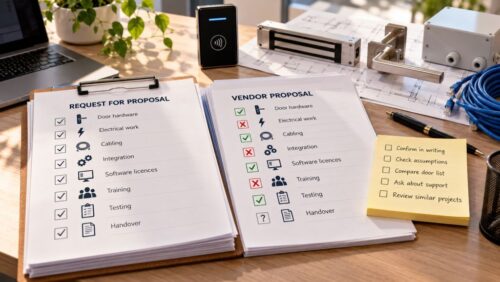
Specify what the contractor hands over: test results for every door, configuration records, as-built drawings, operating instructions and administrator training. A system that works on installation day but leaves your staff unsure how to add a user or pull a log is not finished.
Set out who will manage user accounts after handover, how lost credentials are cancelled, and who handles faults, software updates and maintenance. Ask vendors to state warranty coverage, support hours and response times. A facility that operates around the clock may need a different support arrangement from an office that closes every evening, and the RFP is where you say which one you are.
Before awarding the contract, check that the agreed scope, exclusions, price, timeline and responsibilities are all in the contract documents. Anything still unclear is cheaper to settle now than after the first door has been drilled.
A site walk with a systems integrator before the RFP is issued can expose cable routes, containment and power limits that would otherwise come back as variations after award. Contact Comnet for access control installation for facilities across Singapore.
Related Articles:
Smart Access Control System Features That Singapore Offices Actually Need
If you’re looking to upgrade the security of your office, it’s easy to get lost in long lists of...
Access Control System Pre-Installation Planning: Essential Requirements Checklist
A smart access control system is a major element of contemporary building and office security. It...
Complete Guide to Access Control System Installation: Planning, Implementation & Best Practices
Businesses and property owners looking to enhance security, manage access, or meet regulatory...

Singapore Office (HQ)
| Comnet Systems Pte Ltd | ||
| Address: | Block 1002 Jalan Bukit Merah #07-01/03 Singapore 159456 |
|
| Main: | +(65) 6272 3383 Click to Call | |
| Support: | Tech@Comnet.sg | |
| Enquiry: | Sales@Comnet.sg |
Philippines Office
| Comnet Systems Integration Inc. | ||
| Address: | Unit 6G , CBC Corporate Center, 724 Shaw Blvd, City of Mandaluyong, Second District, NCR, Philippines, 1555 |
|
| Main: | +63 2 85247088 Click to Call | |
| Support: | general@comnet.ph |
